Made for iPhone & iPad · Thoughtfully at home in your kitchen
On the menu tonightA little golden-hour comfort.Lemon Saffron Chicken · 45 min
Save what inspires youPlan a little aheadCook with confidenceMake it your own
FROM “THAT LOOKS GOOD” TO “DINNER’S READY”
A home for your recipes. A rhythm for your kitchen.
Less piecing things together. More making something you love.
Worth saving. Worth making again.
01 / COLLECT
Keep the good ones.
Bring in recipes from the web or shared recipe text. Add your own, keep personal notes, and gather your favorites into collections that feel like you.
Moving in? Import Paprika, Mela, or Plan to Eat exports.
YOUR WEEK, A LITTLE LIGHTER
MON
Lemon Saffron Chicken
TUE
Harissa Chickpea Salad
WED
Creamy Mushroom Pasta
02 / PLAN & SHOP
Give dinner a head start.
Plan breakfast, lunch, and dinner for the week. Turn your plan into an organized grocery list, combine matching ingredients, and account for what’s already in your pantry.
A little planning. Fewer “what’s for dinner?” moments.
IN YOUR ELEMENT
One step. One lovely meal.
5:00Time to let the saffron bloom.
03 / COOK
Stay in the moment.
Settle into focused, step-by-step cooking with ingredients close by and timers where you need them. Scale servings to your table and keep your place along the way.
Hands full? Try “Hey Saffron next” while the app is open.
THOUGHTFUL ON EVERY SCREEN
A kitchen that feels like yours.
Room to spread out on iPad. Ready by your side on iPhone.
REAL APP. EVERYDAY MAGIC.Made for the way you cook.
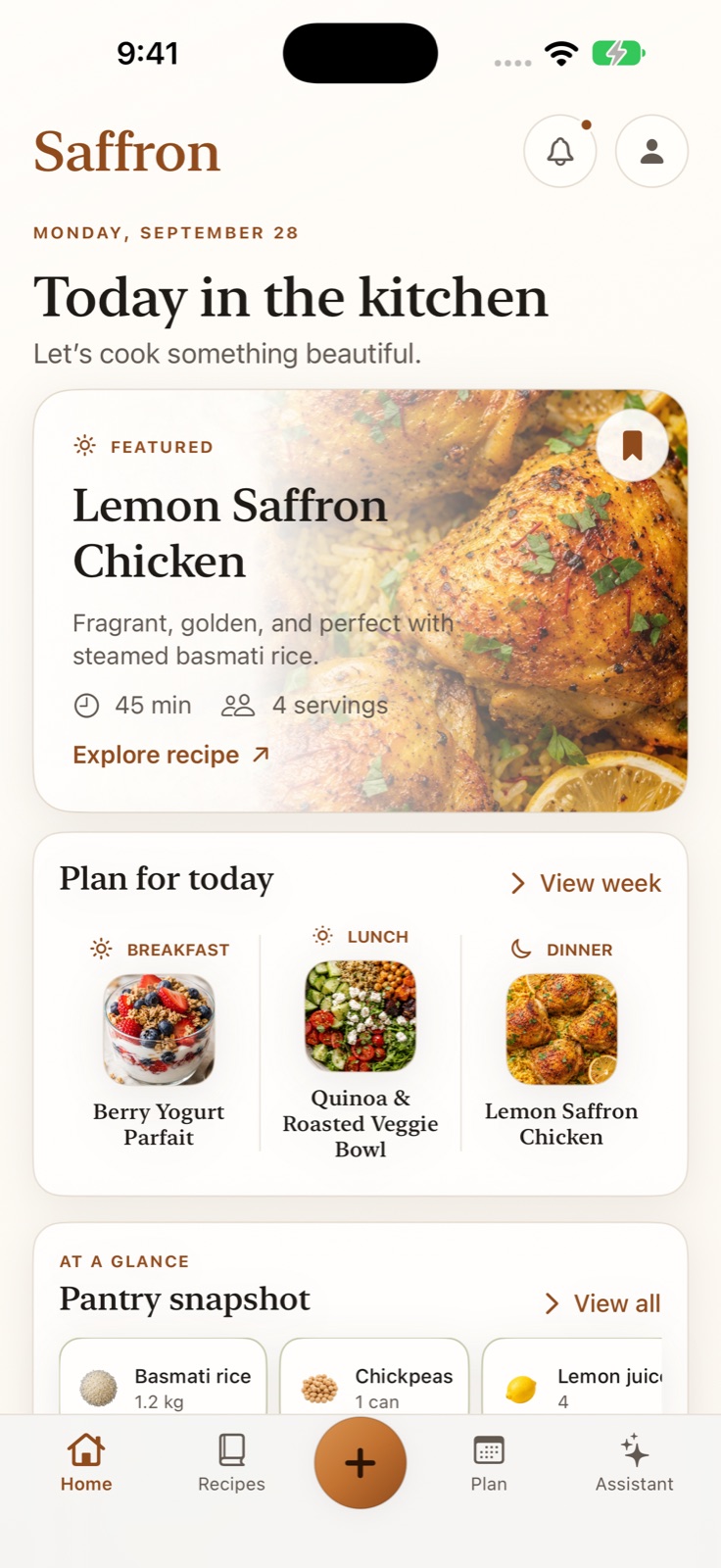
A welcoming overview of your day, from the first idea to tonight’s dinner.
Choose a screen above. Tap the expand button for a closer look.
A little help goes a long way.
MEET YOUR COOKING COMPANION
A second pair of hands. Figuratively speaking.
Ask about a substitution. Work through a technique. Adjust a recipe to suit the way you eat. Saffron’s assistant keeps your cooking context in mind, so the conversation can follow you from prep to plate.
Explore ingredient swaps and recipe variations
Get help with the recipe you’re actually cooking
Keep preferences and cooking context close
Apple’s on-device intelligence powers richer assistance on supported devices, with built-in cooking actions available as a fallback. Optional “Hey Saffron” listening works while the app is open.
THE SMALL THINGS MAKE IT SAFFRON
Made with care. Used with joy.
Your kitchen, kept close.
Your library is saved on your device, so your recipes stay with you offline. Optional iCloud sync helps bring your kitchen across your devices.
Beautiful, down to the garlic.
An illustrated ingredient catalog, warm colors, and light and dark appearances make even everyday prep feel a little more considered.
Fits the way you cook.
Personal notes, flexible servings, measurement preferences, widgets, and Siri shortcuts. Familiar comforts, thoughtfully brought together.
A fresh spark of inspiration.
Discover featured recipes when you want a new idea, then save the ones you love alongside your own tried-and-true favorites.
GOOD TO KNOW
A few things you might be wondering.
Where can I use Saffron?+
Saffron is built for iPhone and iPad running iOS or iPadOS 26 or later. Its layouts adapt to give your recipes room on a larger screen.
Can I bring my existing recipes?+
Yes. Import accessible recipe websites, shared recipe text, or collections exported from Paprika, Mela, and Plan to Eat. You can review and edit imported recipes before saving. Private or blocked social posts may need their recipe caption shared as text.
Does Saffron work offline?+
Your saved recipe library and core planning tools live on your device. Importing websites, fetching new featured recipes, and syncing through iCloud need an internet connection.
Do I need Apple Intelligence?+
No. Recipes, meal planning, groceries, pantry, and cooking mode work without it. On supported devices, Apple’s on-device models add richer assistant responses; other devices use built-in cooking assistance.
Can I download it yet?+
Saffron is preparing for release. A verified download link and pricing will appear here when available. For now, explore the real app screens above or contact us with a question.
 SaffronMeet your kitchen companion
 Worth saving. Worth making again.